
 Overview
 Planning
 AI Co-Planner (Beta)
 Working
 Reporting
 Monitoring
 Simulation
 Logic Blocks
 Integrating
 The planeus Way
 Consulting & Expertise
 Training & Go-Live
 User Stories
 About us
 System Partners
 Consulting Partners
 Blog
Blog

 FAQs
FAQs
Planning & Control

Master Data
Solves problem: Planning fails when core data is inconsistent or duplicated.
Master Data Logic Block provides a single, reliable source for articles, routings, operation templates, customers, materials, and resources.
It ensures that all planning logic is based on consistent, reusable data that can evolve with your production processes.
Planning Objects
Solves problem: Need a clear structure and scheduling logic to plan consistently.
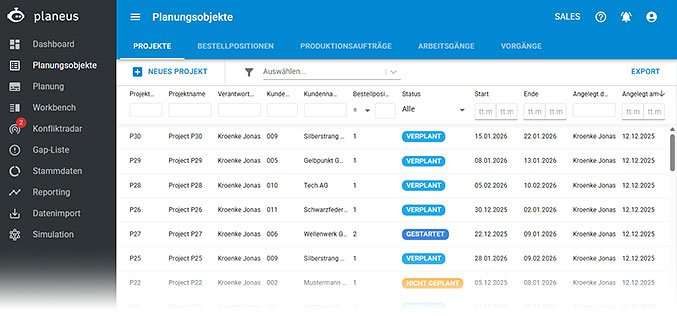
The Planning Objects Logic Block defines orders as structured planning objects and applies the planning algorithm to schedule them automatically.
Projects, order lines, production orders, and operations remain hierarchically connected, so every plan stays coherent and traceable.
Gantt Planning
Solves problem: Planners need to understand and adjust complex schedules quickly.
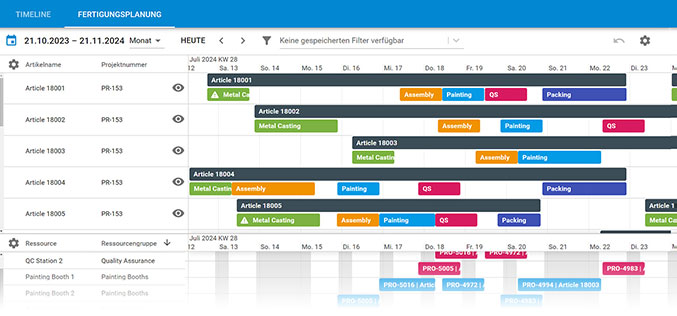
The Gantt Planning Logic Block visualizes all orders, operations, and resources in a single timeline.
It allows planners to reschedule work via drag-and-drop, immediately revealing free capacity and overloads without losing context.
Conflict Radar
Solves problem: Conflicts and delays are often discovered too late.
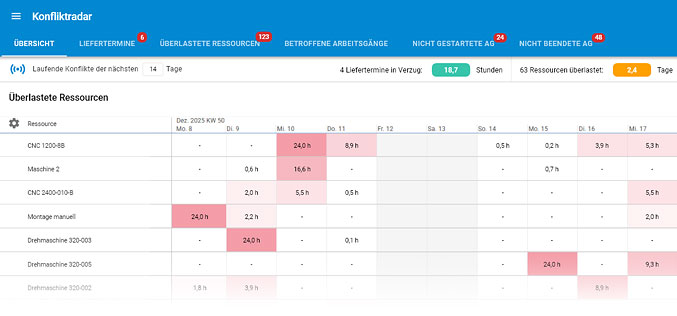
The Conflict Radar Logic Block makes deviations visible early by highlighting resource bottlenecks, missed delivery dates, and missing feedback.
Each conflict links directly to its cause, enabling fast resolution before problems escalate.
Parallel Resources
Solves problem: Operations require multiple resources (e.g., a machine requires a specialist; a process requires a specific tool) at the same time.
The Parallel Resources Logic Block ensures that all required resources — such as specific machines, employees. tools, or fixtures — are planned simultaneously, preventing incomplete schedules or unnecessary delays.
Multifunctional Resources
Solves problem: Need to efficiently use resources with multiple skills or capabilities for flexible scheduling.
The Multifunctional Resources Logic Block can automatically allocate tasks to resources (e.g., employees and machines) with multiple qualifications and capabilities.
Capacity Plans
Solves problem: Planning ignores resource unavailability and produces unrealistic schedule.
The Capacity Plans Logic Block defines when employees and machines are available.
It provides a transparent and maintainable basis for realistic capacity planning.
Configuration
Solves problem: Looking for a flexible way to update new planning parameters and change system behavior.
The Configuration Logic Block allows you to easily adjust system behavior such as units of measure, object names, and disruption reasons, ensuring the system adapts to your new steps, terminologies and processes.
Work Step Master Data
Solves problem: There is no way to know which operations run on which resources.
The Work Step Master Data Logic Block provides a consolidated view of all operations and their assigned resources, enabling fast validation and consistency checks.
Administration
Solves problem: Users, permissions, and system settings are difficult to control.
The Administration Logic Block centralizes user management, access rights, licenses, and system settings, ensuring secure and controlled operation.
Gap List
Solves problem: Planning ignores unplanned absences and downtime and produces unrealistic schedule.
The Gap List Logic Block captures short-term capacity losses such as vacation, sick leave, or maintenance and automatically reduces available capacity in planning.
Calendars
Solves problem: Planning ignores planned non-working days and produces unrealistic schedules.
The Calendars Logic Block defines weekends, public holidays, and shutdowns and automatically excludes them from available capacity, ensuring that plans reflect real working time.
Pausing Orders
Solves problem: Inactive tasks and orders stay in the plan and create chaos.
The Pausing Orders Logic Block can temporarily remove tasks from the plan while preserving all feedback, allowing production to resume cleanly.
Advanced Planning
Assemblies
Solves problem: Multi-level components and products are hard to plan and track correctly.
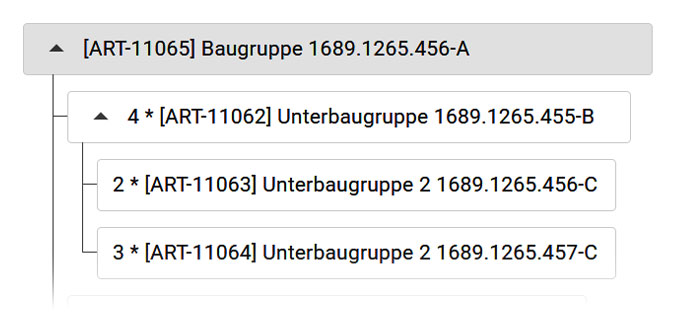
The Assemblies Logic Block breaks products into structured subassemblies and automatically creates linked production orders, keeping complex structures understandable and traceable.
Utilization
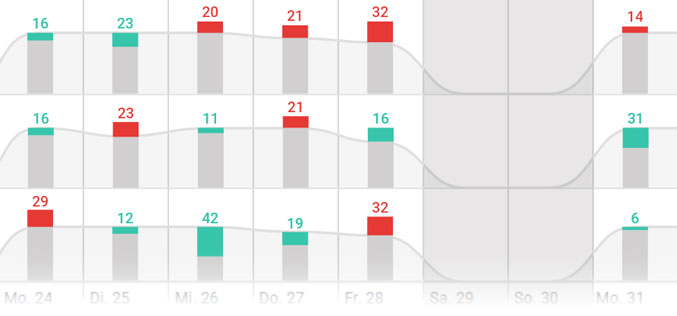
Solves problem: Manual resource capacity planning takes too much time.
The Utilization Logic Block shows whether a defined group of resources can cover a planned time period, supporting realistic overview on the predicted result of your capacity planning.
Cycles
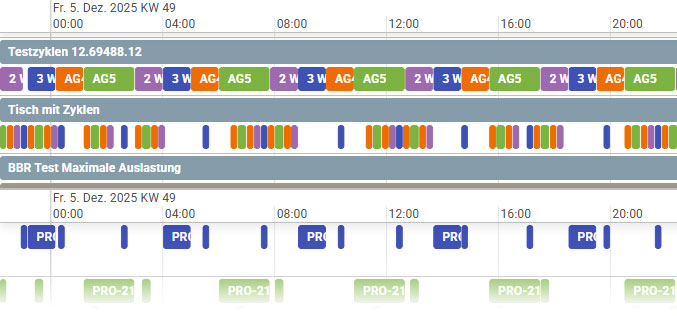
Solves problem: Repetitive steps and operations require unnecessary manual planning.
The Cycles Logic Block automates the planning of repeating operations directly in routings and ensures they are scheduled correctly by the planning algorithm.
Order Splitting
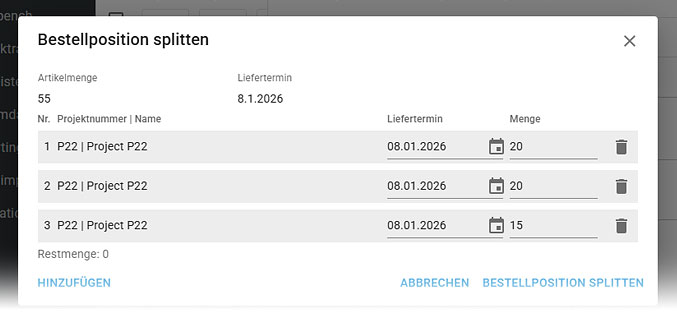
Solves problem: Large orders often block efficient production flows.
The Order Splitting Logic Block splits large quantities into smaller production orders while maintaining the link to the original customer order.
Characteristics
Solves problem: Detail planning decisions rely on tribal knowledge, manual adjustments or coordination.
The Characteristics Logic Block automatically encodes relevant properties of articles and resources so the planning algorithm can respect sequencing, compatibility, or physical constraints automatically.
Material Requirements Planning
Solves problem: Material shortages and overstock occur due to missing foresight.
The Material Requirements Planning Logic Block calculates required materials, quantities, and timing based on the plan, aligning purchasing with estimated production consumptions.
Resource Programs
Solves problem: Jobs with different requirements mistakenly planned together on the same resource.
The Resource Programs Logic Block separates jobs and operations based on regulatory, quality, and compatibility requirements, ensuring compliant and accurate production.
Simulation
Solves problem: It is too risky to simulate the impact of new changes in live systems.
The Simulation Logic Block creates isolated snapshot of the current plan, allowing safe exploration of new changes, possible improvements, or alternative scenarios before applying changes.
Fixed Start Dates
Solves problem: Certain planned tasks must or can only start at exact times.
The Fixed Start Dates Logic Block enforces immovable start times, ensuring coordination with projects, suppliers, or regulatory constraints.
Attendant Resources
Solves problem: The same resource is required across multiple steps (e.g., employee & container).
The Attendant Resources Logic Block assigns accompanying resources once and applies them consistently to all related operations.
Add Production Orders
Solves problem: New production orders can only be added by replanning everything.
The Add Production Orders Logic Block allows additional production orders to be inserted into existing plans when capacity permits, without destabilizing the schedule.
Resource Priority
Solves problem: Some resources need to be used first.
The Resource Priority Logic Block ensures preferred or more efficient resources are planned before others within the same group.
Qualification Matrix
Solves problem: The uncertainty of who can do what, or which machine can do what.
The Qualification Matrix Logic Block enables automatic task assignment based on resource qualifications, such as employee skills and machine properties.
Quantity Limit
Solves problem: Need to plan without overloading resource capacities.
The Quantity Limit Logic Block enforces the highest capacity limits per resource, balancing utilization and preventing bottlenecks.
Shop Floor Execution
Workbench Classic
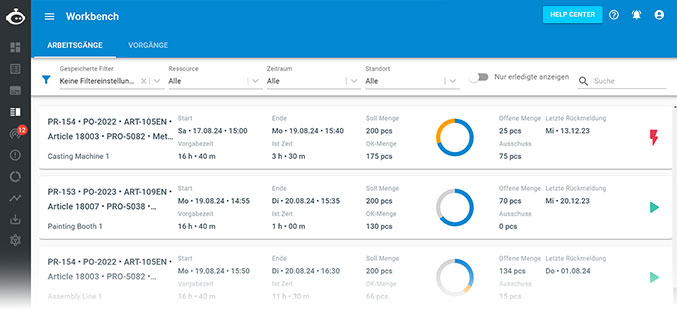
Solves problem: Real-time data collected from shop floor is often manual, delayed, or incomplete for planning.
The Workbench Classic Logic Block adds a real-time, shop floor execution module for recording times, quantities and disruptions in production, which directly interacts with and in just a few clicks away from the planning module, keeping planning and execution aligned.

Workbench Terminal
Solves problem: Need to collect more accurate real-time data from shop floor in an easier way.
The Workbench Terminal Logic Block offers operators a simplified, touchscreen-friendly interface with start–stop functionality for efficient operation feedback.

Workbench Scan
Solves problem: It takes too long for operators to find their assigned jobs.
The Workbench Scan Logic Block uses barcode scanning to navigate directly to the relevant operation, reducing errors and friction.

Workbench Photo
Solves problem: Production issues are poorly documented.
The Workbench Photo Logic Block allows visual documentation directly on the order, speeding up problem resolution.
Custom Fields
Solves problem: Important data is missing or not supported by monolithic systems.
The Custom Fields Logic Block enforces structured, process-specific data capture during shop floor data collection.
RFID Login
Solves problem: Logging into shopfloor systems is slow and disruptive.
The RFID Login Logic Block enables instant, password-free authentication at terminals.
Information & Communication
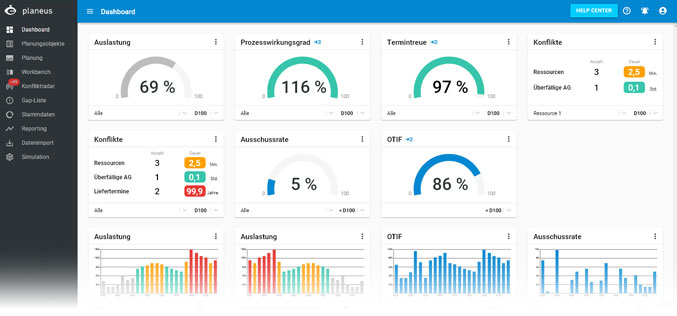
Dashboard
Solves problem: Planners often have to assess the quality of their plan based on gut-feeling or after the plan has been executed.
The Dashboard Logic Block provides real-time updates as well as instant and automated verdict on how planned operations are expected to perform at a future point in time by extracting data from future schedules and quantifying them with KPIs as if they were already completed.
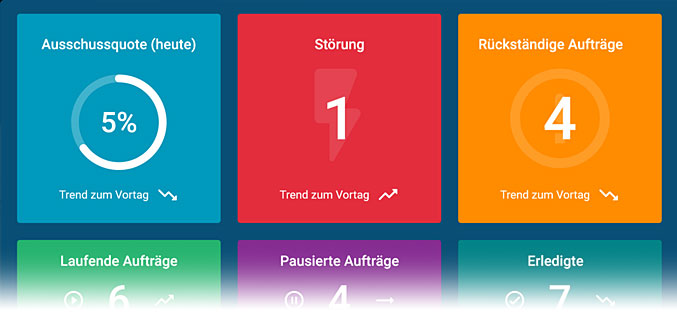
planeus TV
Solves problem: Operators often cannot instantly know where to go next or what’s happening when they arrive on the shop floor.
The planeus TV Logic Block not only provides a live display of KPIs, but also useful data such as upcoming work steps, current tasks, disruptions, and completed work steps extracted directly from the latest plan.
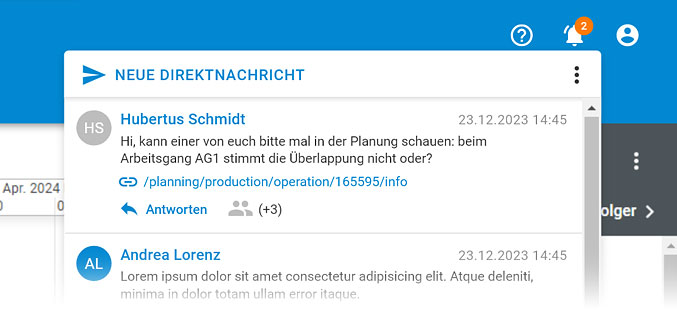
Direct Messages
Solves problem: Communication between planners is often disconnected and requires manual check-ups.
The Direct Messages Logic Block enables instant and contextual inbox messaging linked directly to production orders and activities, keeping collaboration focused and traceable.
Reporting
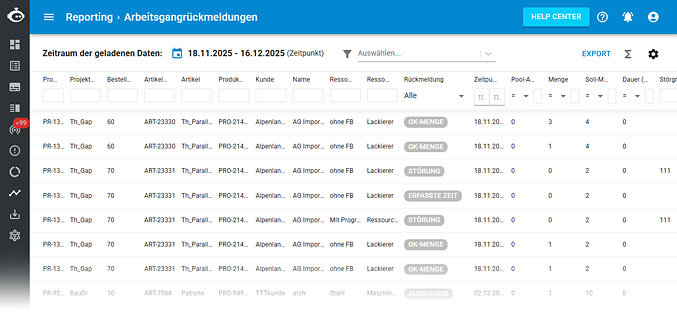
Reporting Basic
Solves problem: Planners need to quickly assess past operation performance.
The Reporting Basic Logic Block provides structured, exportable tables of all feedback data for analysis and follow-up calculations.
Reporting Advanced
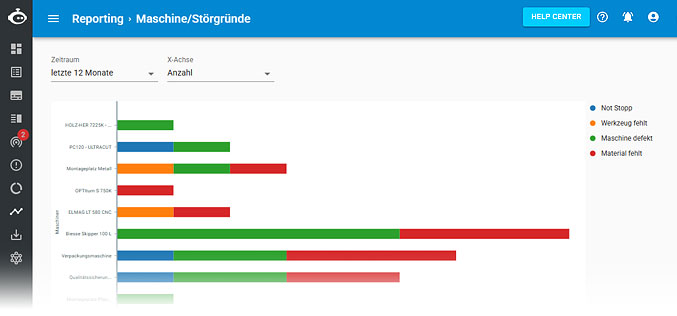
Solves problem: Operators and planners want to know how far they have been deviating from their original plan.
The Reporting Advanced Logic Block delivers graphical analyses such as deviations, scrap, scrap rate, and Target vs Actual (also known as “Planned vs Actual”) comparisons.
OEE
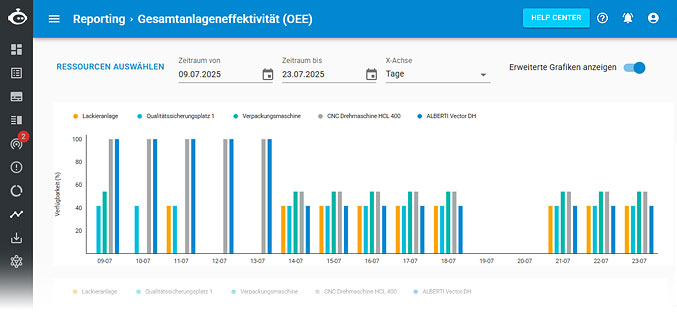
Solves problem: Planners need to quickly assess past machine productivity.
The OEE Logic Block calculates availability, performance, and quality to provide a clear productivity metric.
Capacity Utilization per Resource
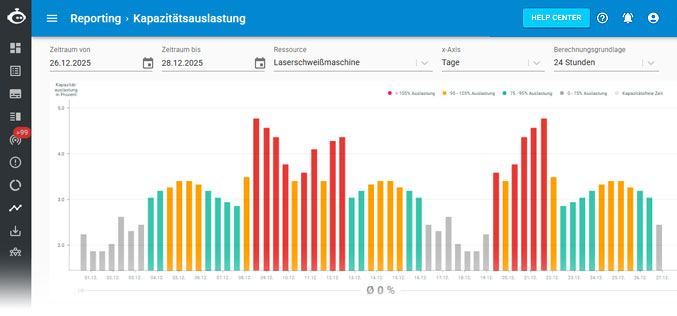
Solves problem: Past resource usage is hard to assess for planners.
The Capacity Utilization per Resource Logic Block visualizes historical utilization of employees and machines over selected time periods.
Schedule Adherence (Historical)
Solves problem: Causes of late deliveries remain unclear to planners.
The Schedule Adherence (Historical) Logic Block analyzes historical delivery performance to identify delays and their origins.
Resource Availability per Day
Solves problem: Planners need to assess past over- or under-capacity of a resource.
The Resource Availability per Day Logic Block shows daily capacity deviations, enabling fast corrective action.
Material Consumption
Solves problem: Past material consumptions remain unclear to planners.
The Material Demand Logic Block displays required material quantities per operation, optionally grouped by material.
Reporting Plugin
Solves problem: Custom reports are not supported by ERP, MES, or require extra IT effort.
The Reporting Plugin Logic Block enables in-system custom report creation and export.
Integration
planeus API
Solves problem: The need to seamlessly connect and synchronize data between planeus and other systems.
The planeus API Logic Block can facilitate seamless data flow, ensuring that information is consistently updated across different platforms. planeus also provides several standardized API connections with popular production systems, IoT solutions, MES, and other partner systems.
Automatic Data Import
Solves problem: Need faster and automated data transfer between planeus and other systems.
The Automatic Data Import Logic Block can continuously check designated file paths for new data files and import them without requiring manual intervention.
Manual Data Import
Solves problem: Paper-based or physical data transfer introduces efforts and errors.
The Manual Data Import Logic Block provides structured, validated imports for master and transactional data.
MCP Connector
Solves problem: The need to fully utilize existing AI platforms or existing MCP connections to establish AI in planning & control.
The MCP Logic Block enables AI-driven cross-system automation, forecasting, conflict-solving, and optimization.
weclapp Integration
The weclapp Standardized Integration automatically synchronizes data between your weclapp ERP system and planeus.
Unleashed Integration
The Unleashed Standardized Integration automatically synchronizes data between your Unleashed system and planeus.
symestic Integration
The symestic Standardized Integration automatically synchronizes data between your symestic MES and planeus.
Sage b7 Integration
The Sage b7 interface automatically exchanges data between your Sage ERP system and planeus.
MasterControl Integration
The MasterControl Standardized Integration automatically synchronizes data between your MasterControl system and planeus.
Additional Logic Blocks
External Partner
Solves problem: External partners, such as suppliers or service providers, often lack access to retrieve and update relevant information about latest production status.
The External Partner Logic Block allows chosen partner to see the data related to their tasks under restricted and customizable view, as well as update their progress, creating a more collaborative environment between companies and their external partners.
Two-Factor Authentication (2FA)
Solves problem: Security requirements and vulnerability to unauthorized access.
The 2FA Logic Block adds an additional security layer during login.
Download Project Data
Solves problem: Planning data cannot be archived externally.
The Download Project Data Logic Block enables complete export of project data and attachments.
planeus Help Center
The planeus Help Center Logic Block provides AI-supported knowledge base assistance directly within planeus.
